Release Notes for Coreform Cubit 2026.8
We are pleased to announce the release of Coreform Cubit™ 2026.8. This release introduces a new webcut offset operation for creating boundary layers and adds protrusion support throughout, from removal via the Remove Surface command to selection and diagnostics in the GUI. Anisotropic sizing gains geometry-based options for conical geometries, and Boolean operations can now preserve the tool body. Rounding out the release are faster facet-based geometry evaluations, more robust triangle meshing, and new Python API functions for protrusion queries and sideset contact pairs.
(Download Coreform Cubit here.)
Released: 20 August 2026
Table of Contents
Meshing
Enhanced geometry-based anisotropic sizing specification
New options are now available for anisotropic sizing on conical-type geometries. A new theta_interval option can be used to define intervals as an alternative to using theta to define a size. Additionally, one can specify a theta_axis option if an axis cannot be directly computed from the input geometry. Geometry feature sizing can now be combined with anisotropic sizing to produce finer elements in areas of high curvature.
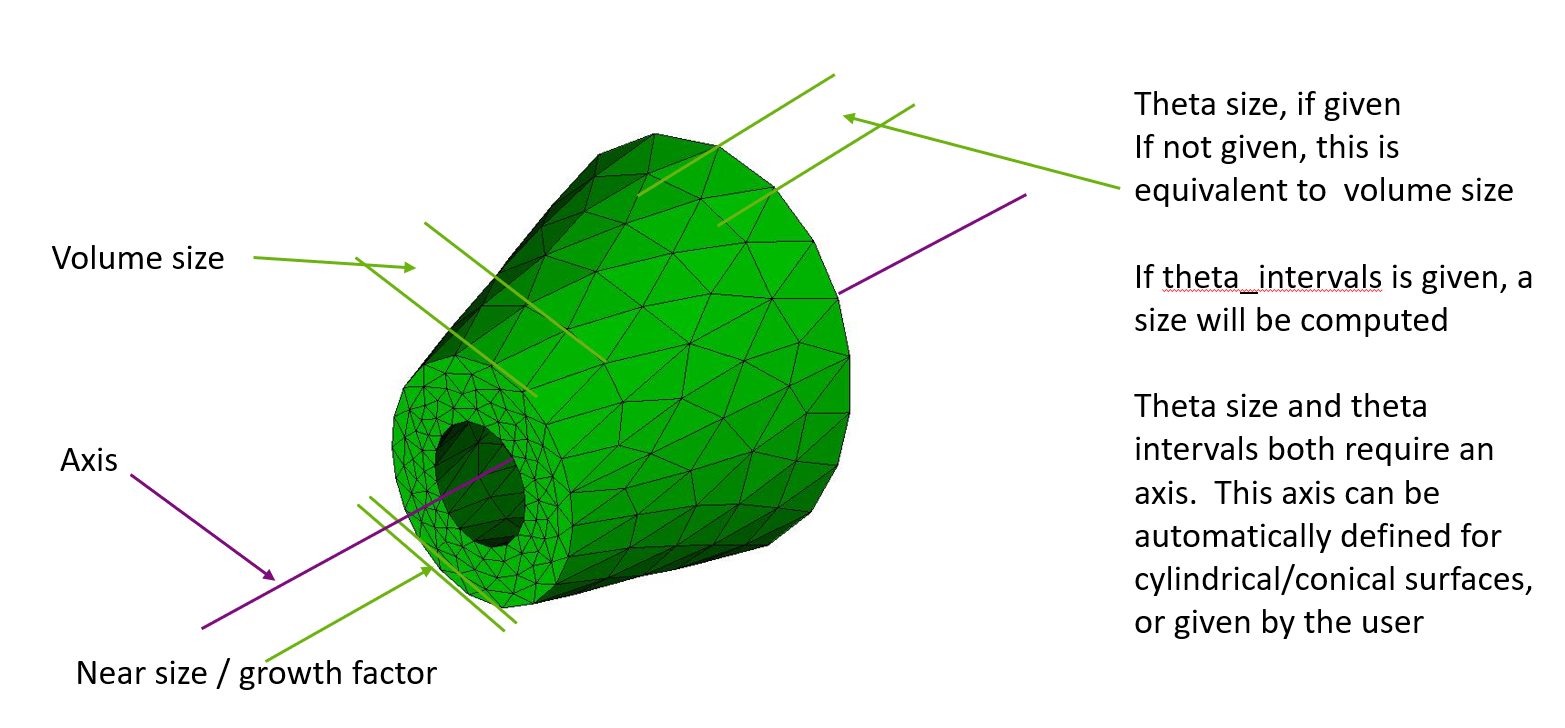
A conical geometry with an anisotropic mesh
For more information see: Anisotropic Sizing Function
Improved polyhedron scheme support in automatic meshing and sweeping
Volumes that meet the requirements of the polyhedron scheme are now meshed automatically, rather than having to have the scheme set explicitly on each one. Automatic scheme selection considers polyhedron after mapping, submapping, and sweeping, and reports a warning rather than meshing when a volume is unlikely to produce acceptable element quality. Polyhedral volumes can also now share boundaries with mapped, submapped, and swept regions: a four-sided surface of a polyhedral volume may use the map or submap scheme and may be meshed in advance, and four-sided polyhedral surfaces are now recognized as linking surfaces for sweeping. Previously a polyhedral volume required the polyhedron scheme on every one of its surfaces, and a neighboring volume would not sweep or submap automatically across the shared surface.
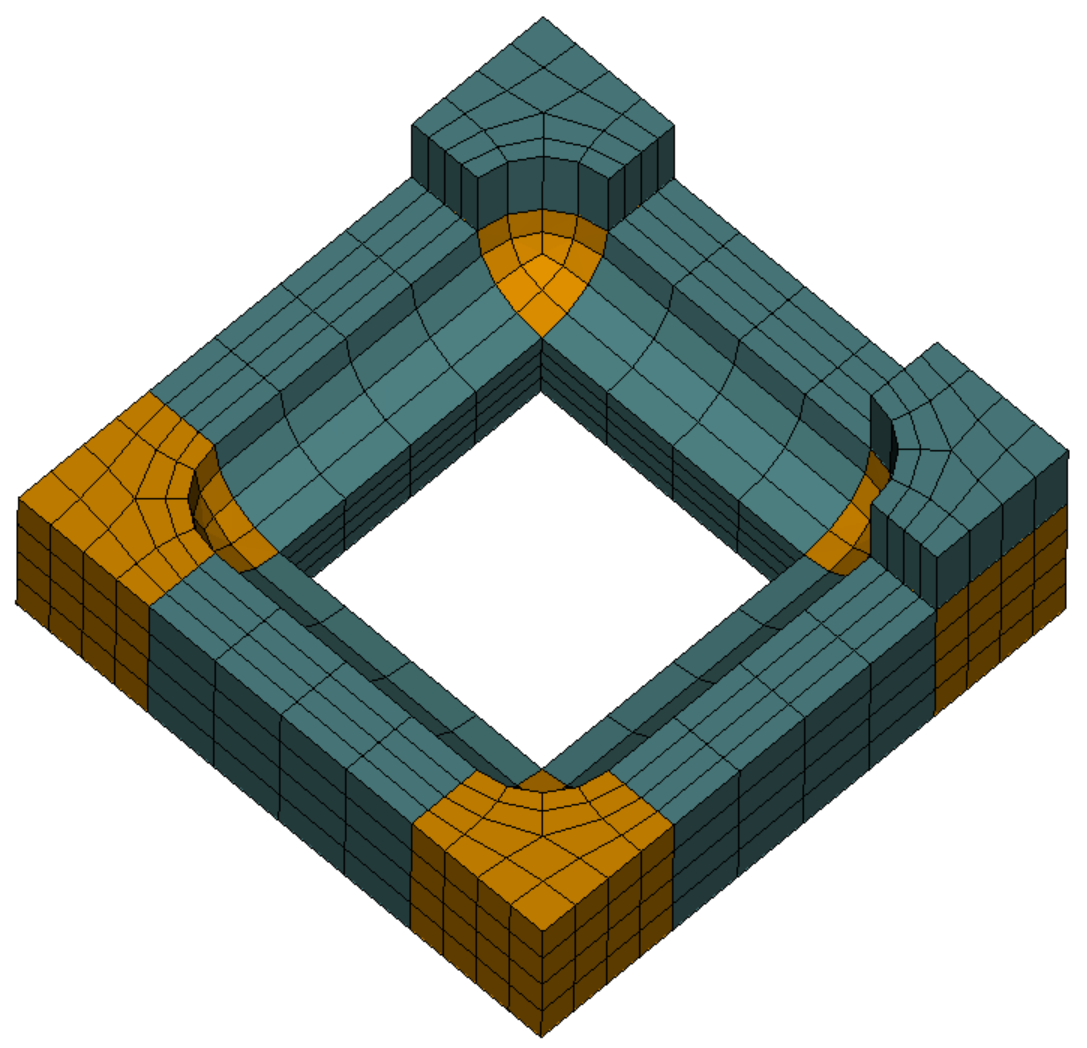
Polyhedral cells at each corner (orange) meshed automatically alongside swept regions (teal) in a single operation. The quads meeting at a single node on each corner face are characteristic of the polyhedron scheme.
For more information see: Polyhedron meshing scheme
Improved robustness for triangle meshing
Triangle meshing robustness has been improved with an updated version of MeshGems. Additionally, triangle meshing of composite surfaces is improved by using underlying analytic representations for more use cases.
For more information see: Trimesh
Hardened tri and tet collapse operations
Several bugs were fixed in tri and tet collapses to increase element quality and to better handle higher-order nodes.
For more information see: Collapsing Mesh Edges
Geometry
Performance and robustness improvements for facet-based geometry
Performance of geometry evaluations on facet-based geometry and composite geometry has been increased with more efficient calculations.
For more information see: Mesh-Based Geometry
Enhancements to sliver surface/curve removal
Users can better control sliver removal by excluding specified curves and surfaces from removal.
For more information see: Remove Sliver Surfaces
New Boolean subtract option
Boolean operations (subtract, unite, intersect) now have a keep_tool option, preventing the tool volume/body from being consumed.
For more information see: Subtract
New webcut offset operation
You can now webcut by offsetting a set of surfaces. This decomposition can be useful for creating boundary layers. In the images below, the half cylinder is webcut by offsetting three of its surfaces inward. The loft option creates individual volumes for each offset surface.
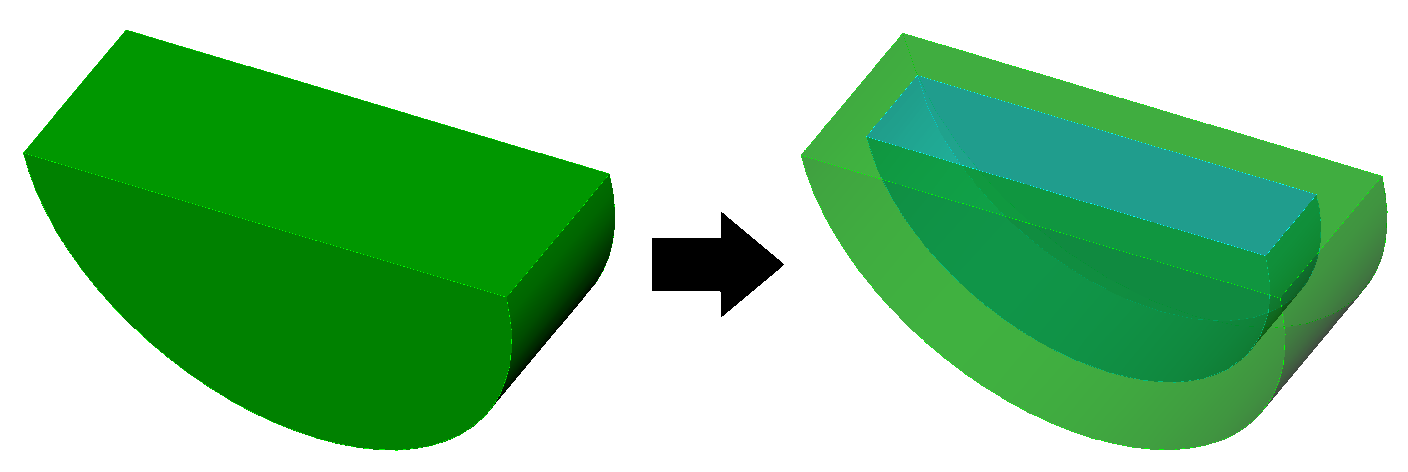
Webcut offset
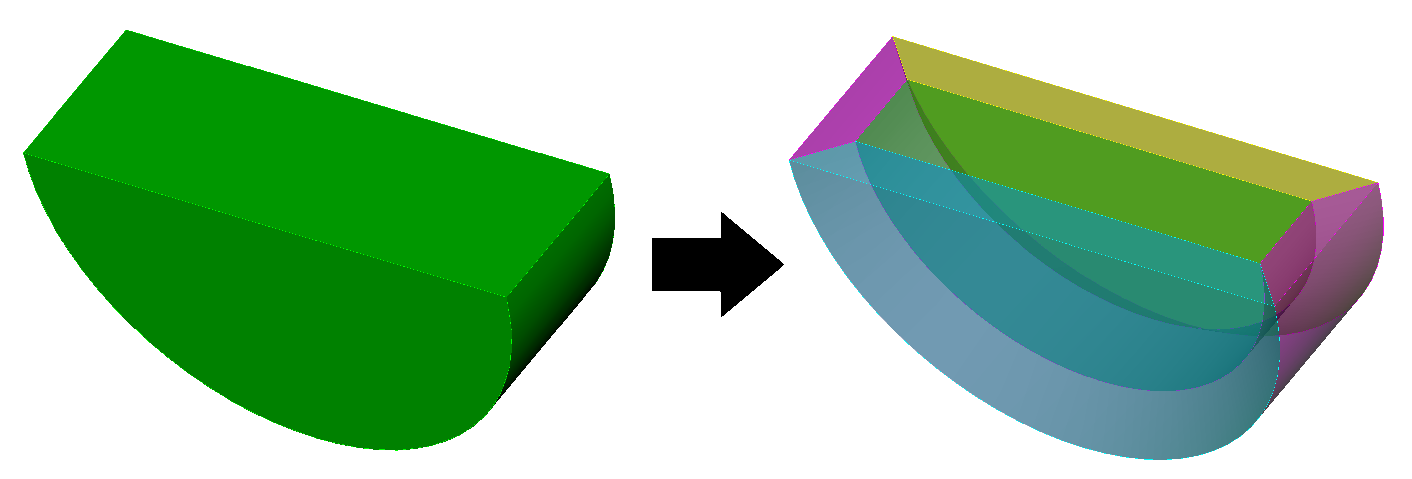
Webcut offset with the loft option
For more information see: Web Cutting
Remove Surface command supports protrusion removal
The Remove Surface command can now remove all surfaces belonging to a protrusion by selecting a surface on the protrusion.
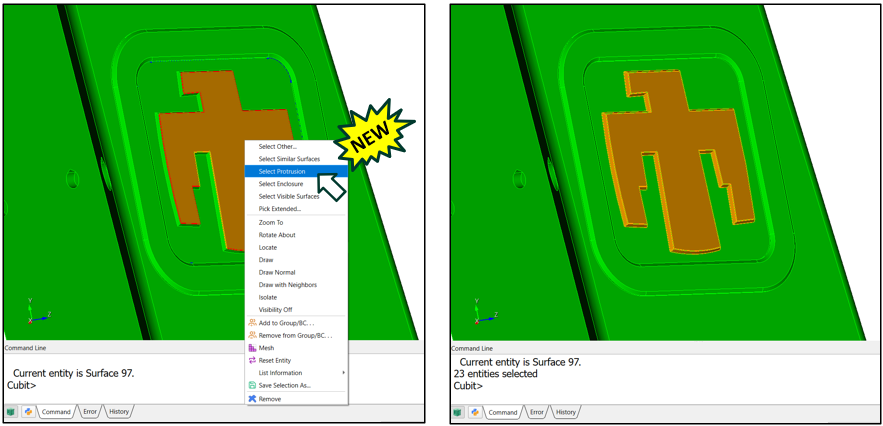
Left: the “Select Protrusion” option in the right-click menu. Right: the resulting selected protrusion.
For more information see: Right Click Commands
Python API support for protrusion queries
New Python API functions are available to identify protrusion surface collections, test whether a surface belongs to a protrusion, return the surfaces in a protrusion, and generate protrusion removal solution commands.
For more information see: Coreform Cubit™ Python API
Graphical User Interface
Journal editor font consistency
The journal editor now uses a consistent font for all documents.
For more information see: Journal Editor
Protrusion selection and diagnostics
The graphics window context menu now supports selecting protrusion surface sets. A protrusion diagnostic has also been added to the Geometry Power Tool.
For more information see: Geometry Power Tools
GUI options for import/export file formats
Added GUI elements for convenient selection of the GAMBIT neutral file format (.neu) and other supported import/export file formats previously available via CLI commands only .
Miscellaneous
Python API support for sideset contact pairs
A new Python API function can identify sideset-based contact interfaces for specified volumes or blocks and return compact contact interaction records.
For more information see: Coreform Cubit™ Python API
Python scripts with message handlers
Python scripts are now allowed to use message handlers to capture and process output, even while running under the GUI. Previously, this was allowed only for scripts running under a user-started Python process.
For more information see: Coreform Cubit™ Python API

© 2026 Coreform, Inc., All Rights Reserved