Release Notes for Coreform Cubit 2026.6
We are pleased to announce the release of Coreform Cubit 2026.6. This release introduces anisotropic tetrahedral meshing and cohesive element generation for crack and interface modeling, plus new higher-order element quality metrics and more robust triangle/tet meshing. The GUI gains full dark mode support with a redesigned icon pack, and I/O adds 64-bit Exodus IDs alongside expanded ABAQUS and I-DEAS import support. Rounding out the release are new machine-learning features for GNN models and an updated Python 3.12 runtime.
(Download Coreform Cubit here.)
Released: 1 June 2026
Table of Contents
New skew control option for curve skinning
A new pair tolerance <value> option is available for the create surface skin curve command to control potential skew. Vertices in the given curves are paired within tolerance, and if a pair is not found, a new vertex is introduced. This behavior is now the default behavior when giving the skin option for the reduce surface slot command.
For more information see: Create Surface
Improved robustness and performance of composite surfaces
Facet generation on large composite surfaces is now faster, and triangle meshing of composite surfaces has been made more robust.
Using namespaces to track names
A new naming syntax has been added to allow better tracking of names across operations. Coreform Cubit® object names can now include a colon :. This allows using a standard namespace that can be tracked through operations. When a name is pushed onto the namespace stack, that name is applied when an entity is split. For example,
brick x 1
volume 1 name 'part'
namespace push 'left'
webcut volume 1 plane xplane
Results in two volumes named part and left::part. The newly created volume will always have the namespace applied to it. This provides an easier tool for tracking items that were created as the result of a webcut.
namespace push <string>
namespace pop
namespace <string> rename <string>
namespace <string> strip
list namespace
clear namespace
Development is ongoing on this feature.
Meshing
Improved robustness of triangle and tet meshing
Triangle and Tet meshing has been improved for better stability and mesh quality. This can be particularly noticeable on models with composite surfaces. While most models saw normal meshing operation, some did not. Below is an example of a case that was corrected.
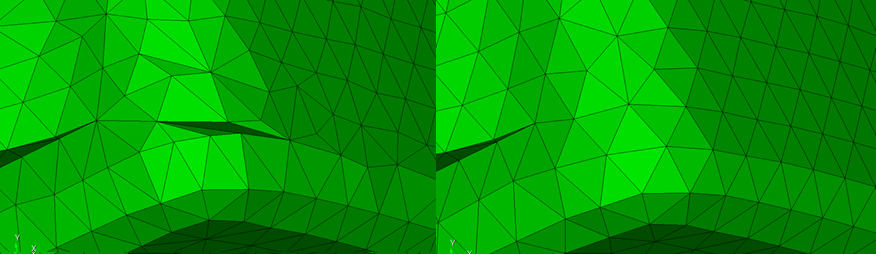
For more information see: Trimesh
Increased accuracy and precision when computing mesh quality metrics
Mesh quality metrics have improved accuracy and precision, specifically those metrics with normalized values. For example, an extremely tiny tet element could see a more accurate scaled Jacobian metric.
For more information see: Mesh Quality Assessment
New mesh quality metrics for higher order elements
Jacobian and scaled Jacobian metrics are now implemented for Tetra10 and Tri6 higher order elements. These metrics now have the ability to detect poorly shaped elements due to poor placement of mid-edge nodes.
For more information see: Higher Order Metrics
Cohesive element generation and improvements
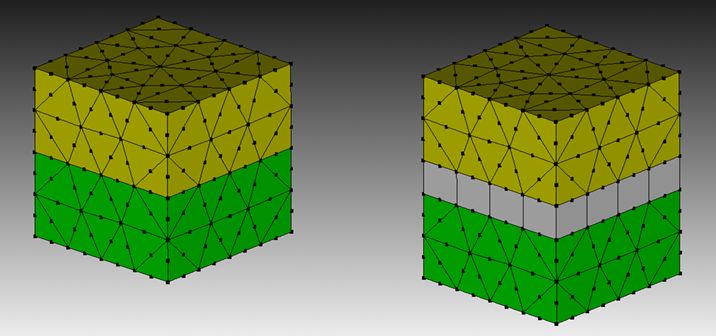
A new method is introduced to support creation of cohesive elements. This is useful for crack modeling and cohesive interface modeling. The new create cohesive element block <value> surface <ids> command will unmerge the given surfaces, and insert cohesive elements in the newly unmerged region. This modeling technique can also be combined with pre-cracking, where a portion of the crack is already separated.
For more information see: Creating Cohesive Elements
Improved ability to create cohesive surface elements.
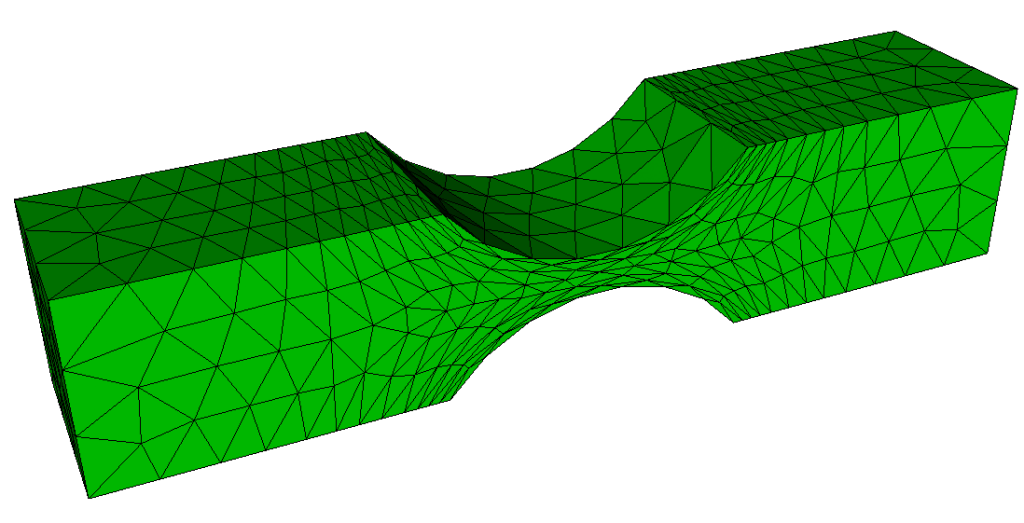
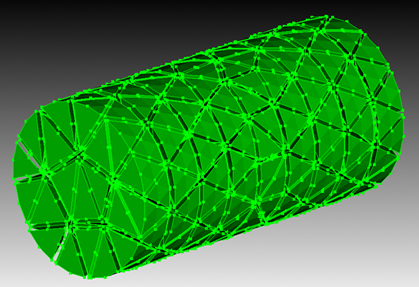
Anisotropic tetrahedral meshing
Improved robustness sweeping with redistribute nodes
Sweeping with redistribute nodes is more robust: node spacing now cascades correctly across consecutive four-sided linking surfaces, and skew that was previously introduced when redistributing nodes on non-planar surfaces has been corrected.
Reduction in memory and increase in performance in Sculpt refinement
Parallel Sculpt jobs that perform refinement now use significantly less memory, allowing large models to run on HPC nodes that previously ran out of memory. The savings come from limiting refinement within the ghost-cell layers shared between processors.
Graphical User Interface
Dark Mode Support
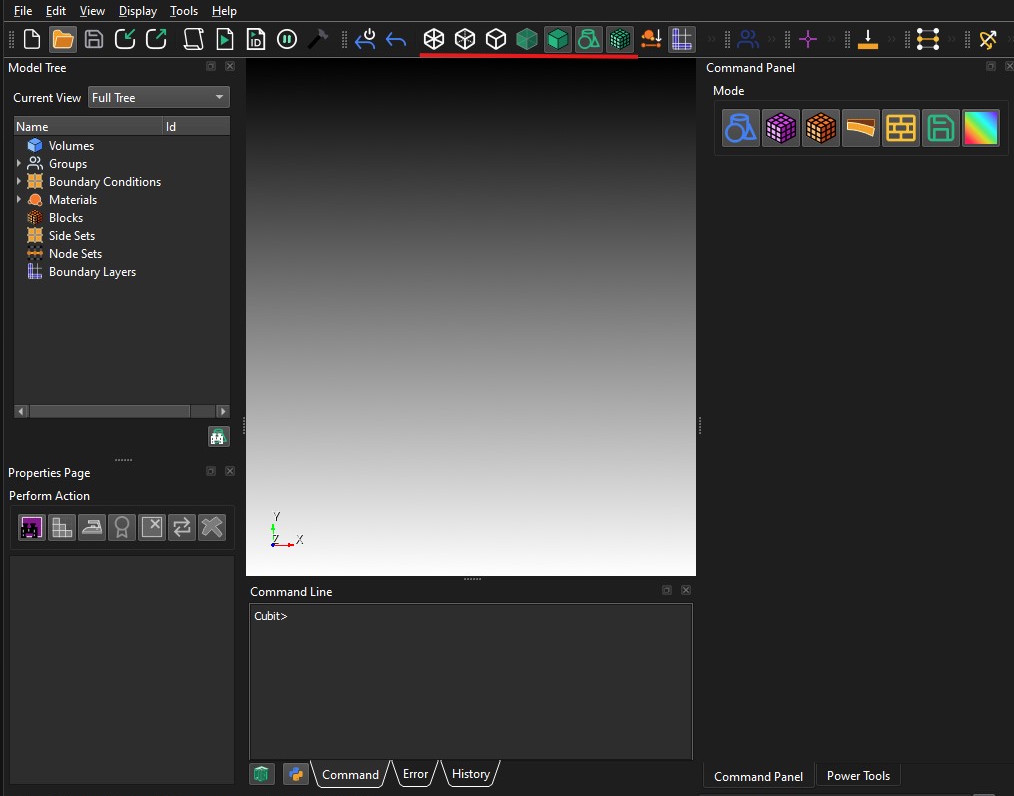
Support for dark mode has been improved by fixing highlight colors, and adding a dark mode icon pack so that icons and text are more clearly visisble. In addition, some of the new icons have been tweaked to better match the original designs so they are more recognizable to long term users.
PNG default for shortcut when saving image file of graphics view
When using the control-h key to save a snapshot of the graphics view, a .png is now created, instead of .jpg.
Journal editor enhancements
The journal editor now has new F5 and Control-F5 option for playing the whole script or the selection portion of the script. Also, the font has been corrected to use a fixed width font, or follow the user selected font.
For more information see: Journal File Editor
Shrink visualization of higher order elements
Visualization of sideset pairs in contact
A new Draw in Context option in the model tree displays a selected sideset together with neighboring sidesets and their owning volumes in wireframe, making it easier to inspect paired sidesets that represent contact sets.
Input/Output
New support for additional Abaqus cards when importing files
Abaqus cards MASS and CONNECTOR are now supported. Also, part transformation issues in some models has been corrected. Grouping of nodes and elements when importing a file has been improved and made consistent with respect to the multiple ways of specifying groups.
For more information see: Exporting Abaqus
Solver element mapping
The solver_element command allows users to map Exodus element types directly to Abaqus element types. The mapping can be defined on a global level or on an individual block. Solver element mappings are stored in the cub/cub5 file.
[create] solver_element <solver string> <new element string> from
     <exodus element string>
block <ids> solver_element <solver string> <new element string> from
     <exodus element string>
list [block <ids>] solver_element [<solver string>]
New 64 bit ID support in Exodus files
Coreform Cubit® is now able to write Exodus files with 64-bit ids. The user interface is updated to provide this option and a new command set exodus 64bit {on|off} is available for scripts.
For more information see: Exporting an Exodus II File
Improved support for degenerate elements during import and export
Importing meshes that contain degenerate elements is more reliable: degenerate hexes are converted to their true element types — tetrahedra, wedges, or pyramids — on import, and these element types can likewise be written as degenerate hexes with full sideset support on export for compatibility with external codes.
Faster opening of Coreform Cubit® files with assemblies
Opening Coreform Cubit® files that contain assembly data is now faster, thanks to more efficient handling of assembly metadata during import.
Ability to import sidesets from I-DEAS UNV files
Pressure-load datasets in I-DEAS UNV files are now imported as sidesets, automatically creating surface groups that preserve the IDs and names from the source file. This simplifies bringing boundary-condition data over from I-DEAS models.
Improved MCNP import
The MCNP importer is integrated directly with Coreform Cubit®. The new code is significantly more robust than the previous code.
Machine Learning
New features for graph neural network models
Coreform Cubit® now supports five new feature strategies for graph neural networks: vertex-nodes, curve-nodes, surface-nodes, vertex-curve-edges, and vertex-surface-edges. These strategies are designed around a graph representation of BRep topologies in terms of vertex, curve, and surface nodes connected by edges between vertex-curve and vertex-surface pairs. These features can be accessed via the get_ML_features function in the Coreform Cubit® Python API.
For more information see: Coreform Cubit® Python API
Faster feature compute times
We removed proximity-based features from our feature sets due to unacceptably long compute times. These features were designed to identify neighboring entities positioned close to each other in Cartesian space; however, the polynomial runtimes required to identify these entities cannot be justified by their relatively small improvement in machine learning prediction accuracy.
Support for user-defined mesh configuration settings
Coreform Cubit® now supports a set of user-defined mesh configuration settings (geometry sizing and regularization) directly in the feature sets for our mesh quality prediction models. This empowers the user to generate machine learning models for the specific mesh configurations that best fit their use case. Support for more configurations will be added in future releases.
Miscellaneous
New set error on/off for filtering messages
It is now possible to disable printing of error messages, similar to how it is possible to disable warning and information messages. This can be done using the set error {on|off} command.
For more information see: Message Output Settings
Updated Python 3.12 version included in distribution
Coreform Cubit® now includes Python 3.12 which is used when running scripts within Coreform Cubit.
Other versions of Python 3 continue to be compatible when Coreform Cubit® is imported into an externally executed Python script.
Improved documentation for Python API
The Python API documentation has been enhanced to provide more description on usage, and more examples.
For more information see: Coreform Cubit® Python API
More robust cavity selection
The existing surface cavity selection tools have been enhanced with a more robust cavity identification algorithm that no longer flags spherical protrusions or near 180° blend surfaces as cavities.
For more information see: Right Click Commands
Improved support for code blocks and multi-line statements for Python scripting
Entering multi-line Python statements and code blocks interactively is now more reliable, with improved handling of indentation, if/elif/else blocks, comments, and blank lines, and automatic detection of when a block is complete and ready to run.