GUI Basic Tutorial Step 10
Step 10: Defining Boundary Conditions
Let us assume that we need to define one material type for the entire mesh, and a single node-based boundary condition on all surfaces. This is accomplished by identifying an Element Block and a Nodeset, respectively; the id numbers assigned to these entities are assigned by the user, usually by some convention meaningful to the analysis to be done. The element block and nodeset are identified from the Materials and Properties button on the control panel.
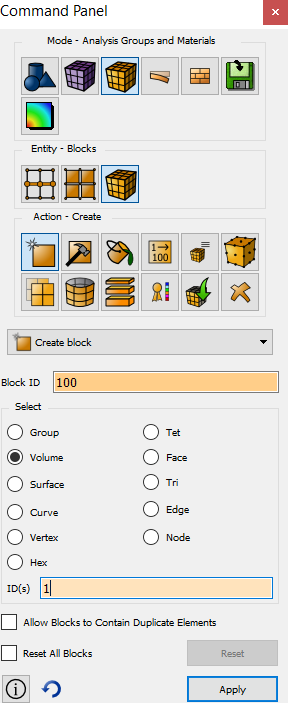
- Select the Analysis Groups and Materials button and then Blocks in the Control Panel window
- Select the Create button
- Select Create block in the pull down menu
- Enter 100 into the Block ID field
- Select the Volume radio button
- Enter the id of Volume 1 by selecting it in the graphics window, or just manually entering in ID(s) field
- Press Apply
Create a nodeset by following the steps below
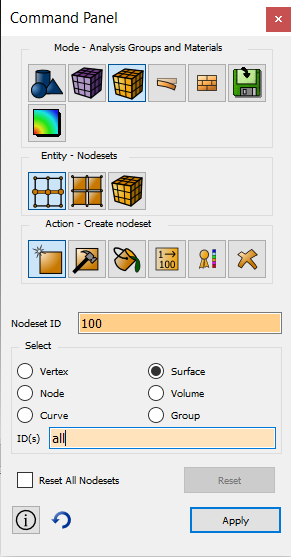
- Open the Nodeset window on the Control Panel
- Select the Create button
- Enter a Nodeset id of 100
- Select the Surface radio button and type all in the ID(s) field
- Press Apply