|
Cubit Python API 17.10
|
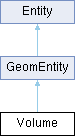
Defines a volume object that mostly parallels Cubit's RefVolume class. More...
Public Member Functions |
|
| def | centroid (self) |
| Get the centroid of the Volume. More... |
|
| def | color (self) |
| Get the RGBA color of this Volume entity. More... |
|
| def | principal_axes (self) |
| Retrieve the principal axes of this Volume entity. More... |
|
| def | principal_moments (self) |
| Get the principal moments of the Volume. More... |
|
| def | set_color (self, value) |
| Set the RGBA color of this Volume entity. More... |
|
| def | volume (self) |
| Compute the three-dimensional volume of this Volume entity. More... |
|
 Public Member Functions inherited from GeomEntity Public Member Functions inherited from GeomEntity |
|
| def | bodies (self) |
| Retrieve bodies contained within the geometry entity. More... |
|
| def | curves (self) |
| Retrieve curves (edges) associated with the geometry entity. More... |
|
| def | dimension (self) |
| Get the topological dimension of the geometry entity. More... |
|
| def | entity_name (self) |
| Retrieve the primary name of the geometry entity. More... |
|
| def | entity_names (self) |
| Retrieve all names assigned to the geometry entity. More... |
|
| def | is_meshed (self) |
| Returns the current mesh state of the GeomEntity. More... |
|
| def | is_transparent (self) |
| Get the transparency state of the geometry entity. More... |
|
| def | is_visible (self) |
| Get the visibility state of the geometry entity. More... |
|
| def | mesh (self) |
| Generates mesh on a GeomEntity and verifies meshing status. More... |
|
| def | num_names (self) |
| Get the count of names assigned to the geometry entity. More... |
|
| def | remove_entity_name (self, name) |
| Remove a specific name from the geometry entity. More... |
|
| def | remove_entity_names (self) |
| Remove all non-default names from the geometry entity. More... |
|
| def | remove_mesh (self) |
| Remove any mesh associated with the geometry entity. More... |
|
| def | set_entity_name (self, name) |
| Assign a name to the geometry entity. More... |
|
| def | set_transparent (self, transparency_flag) |
| Set the transparency state of the geometry entity. More... |
|
| def | set_visible (self, visibility_flag) |
| Set and verify the visibility state of the geometry entity. More... |
|
| def | smooth (self) |
| Smooths the mesh on a GeomEntity to improve element quality. More... |
|
| def | surfaces (self) |
| Retrieve surfaces associated with the geometry entity. More... |
|
| def | vertices (self) |
| Retrieve vertices (points) associated with the geometry entity. More... |
|
| def | volumes (self) |
| Retrieve volumes associated with the geometry entity. More... |
|
|
Public Member Functions inherited from Entity |
|
| def | bounding_box (self) |
| Returns the axis-aligned bounding box of the Entity. More... |
|
| def | center_point (self) |
| Returns the geometric center point of the Entity. More... |
|
| def | id (self) |
| Retrieves the unique identifier of the Entity. More... |
|
Detailed Description
Defines a volume object that mostly parallels Cubit's RefVolume class.
Member Function Documentation
◆ centroid()
| def centroid | ( | self | ) |
Get the centroid of the Volume .
.. code-block:: python
@n return type of : std:: array< double,3 >
- Returns
- A vector (or list) of the coordinates of the centroid of the volume with the indices of the vector corresponding to the values as follows:
- 0 x coordinate
- 1 y coordinate
- 2 z coordinate
◆ color()
| def color | ( | self | ) |
Get the RGBA color of this Volume entity.
Retrieves the current display color of the volume as RGBA channels.
- Note
- if a specific color has not been explicitly applied, this function returns (0.0, 0.0, 0.0, 0.0).
Example create a sphere with radius 1, apply a yellow color (via command or API), and retrieve its color.
.. code-block:: python
@n return type of : std:: array< double,4 >
- Returns
- Array of four doubles representing the RGBA channels of the volume's color.
◆ principal_axes()
| def principal_axes | ( | self | ) |
Retrieve the principal axes of this Volume entity.
Returns the three principal directions (axes) of the volume, corresponding to its principal moments of inertia, as a flattened 3x3 matrix.
Example create a unit sphere and get its principal axes (unit vectors along X, Y, Z).
.. code-block:: python
@n return type of : std:: array< double,9 >
- Returns
- : Array of nine doubles representing the principal axes indicesx0x2 = axisx1 (x,y,z), 3x5 = axisx2, 6x8 = axisx3.
◆ principal_moments()
| def principal_moments | ( | self | ) |
Get the principal moments of the Volume .
.. code-block:: python
@n return type of : std:: array< double,3 >
- Returns
- A vector (or list) of the principal moments of the volume with the indices of the vector corresponding to the values as follows:
- 0 x moment
- 1 y moment
- 2 z moment
◆ set_color()
| def set_color | ( | self, | |
| value | |||
| ) |
Set the RGBA color of this Volume entity.
Applies a display color using red, green, blue, and alpha (opacity) channels.
- Note
- the alpha channel controls opacity (0.0 = fully transparent, 1.0 = fully opaque).
Example create a sphere with radius 1, apply yellow color (full and semi-transparent) via command and API, and force graphics updates.
.. code-block:: python
@n type of value: std::array< double,4 >, in
- Parameters
-
value Array of four doubles [R,G,B,A] in [0,1], where A controls opacity.
◆ volume()
| def volume | ( | self | ) |
Compute the three-dimensional volume of this Volume entity.
Calculates the geometric volume enclosed by this Volume object.
Example create a sphere with radius 1 via command-line, obtain its Volume object, and measure its volume.
.. code-block:: python
@n return type of : float
- Returns
- The computed three-dimensional volume.